
CSI tools Facebook CSI tools Twitter CSI tools LinkedIn CSI tools Instagram
  • Home
  • Newsroom
    • Awards
    • Events
    • Press Releases
    • Publications
  • Software
    • By Solution
      1. Access Risk Management
      2. Access Request Management
      3. Privileged Access Management
      4. Access Role Management
      5. SAP License Audit
      6. Mass User Maintenance
    • Tools
      1. CSI Authorization Auditor
      2. CSI Automated Request Engine
      3. CSI Emergency Request
      4. CSI Role Build & Manage
      5. CSI Mass User Maintenance
      6. CSI Integrate & Collaborate
    • Pathlock
    • Legacy Tools
    • Pathlock Cloud: The Successor of CSI tools
  • Customer Center
  • Community
    • CSI tools Forum
    • Meta's Blog
    • Tech Updates
    • Training
  • About
    • Contact
    • Jobs
    • Partners
      • Become a Partner
    • References
    • Testimonials
    • Sustainability
  • Login

CSItools MetaBlogHeader2018 20180518 v03

  • You are here:  
  • Home
  • Meta's Blog Home
  • Who is doing what in your SAP system?

Who is doing what in your SAP system?

Details
Published: Friday, 27 December 2013 11:39

People who are using a SAP system all know the term "transaction code". SAP data is restricted using role based access controls. Users that get access to the SAP system via a Graphical User interface (I include portal-like functionality just to keep it simple) and the restriction of SAP table data for the users is managed by the assigned authorizations of this user.  If users want to have access to functionality in the SAP system, the transaction code is the front door to get access to this functionality.

STAD data

SAP systems keep track of the transaction codes that were started by the users. This data is stored in the so called STAD data. STAD data can be used for monitoring, analyzing, auditing and maintaining the security concept. When analyzing the access restrictions to SAP functionalities and Segregation of Duty conflicts, STAD data can be used to answer questions like:

  • Who has performed a certain critical functionality? And When?
  • If a user has a critical Segregation of Duties conflict, did he actually perform this conflict?

Also for maintaining and monitoring the security concept the STAD data can be very helpful. It will give the overview of the functionality (transaction codes) that a user did use. This information can be used doing Reverse Business Engineering to decide which functionality the user does and does not need.

SAP systems only stores a limited period of STAD data. The number of days/weeks/months that the data is stored can be managed in the SAP system itself. The larger the period of the STAD data is defined, the more storing capacity the server needs. To downsize this capacity it is possible to make regular downloads of the STAD data and store this somewhere else. If this download is extended to the same database every time, you can have a large period of STAD data which is very valuable information.
 

Example of download STAD data

STAD data can be extracted from the SAP server(s) using the CSI Data Xtractor for example. This tool uses a Remote Function Call connection from the computer to the SAP server and the user logs on with his own SAP logon credentials (figure 1).

Figure 1 – Logon with user-id and password to make RFC connection to SAP system


After selecting the period, the tool makes the downloads and you have a STAD database with all the STAD data from the SAP system (in this example I have created the database in Microsoft Access).

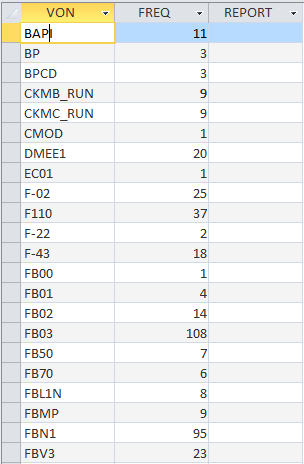
 Figure 2  - example of used transactions per user
 

 Figure 3 – Example of transactions being used
 
 
This downloaded STAD data can be used by own reports/analysis. It is also possible to included this database and data in detailed SAP security analyse tools like CSI Authorization Auditor to analyze which transactions in a certain role were used by the user (figure 4) and of SOD conflicts were executed by the user (figure 5)


Figure 4 – Example of transactions being used in CSI Authorization Auditor


Figure 5 – Example of SOD conflict with Executed (STAD) information


(C) Meta Hoetjes 2014
CSI Authorization Auditor and CSI Role Build and Manage are registered trademarks by CSI tools bvba
www.csi-tools.com
Let's get personal

Let's get personal, request a demo!

Blog Archive

  • The Power of Workflow
  • The NIST framework for SAP Access Security
  • Who has access to your business critical and sensitive SAP data?
  • What are the pros and cons of converting authorization fields to organizational levels?
  • Security risks of Robotic Processing Automation (RPA) in SAP
  • Privileged Access Management
  • The Secure Habits for Securing SAP systems
  • SAP User Licenses
  • Access Certification
  • Implementing compliancy for SAP environments
  • Protection of personal data for GDPR within SAP
  • (SOx) Governance, Risk and Compliance with CSI tooling
  • SAP support packages keeping me busy
  • Role building with (non) organizational values in SAP
  • CSI Authorization Auditor instead of manual control
  • Reverse Engineering for the SAP security concept
  • How to perform critical authorizations and SoD checks in SAP systems
  • Who is doing what in your SAP system?
  • Fine tuning your GRC filter set with Custom transactions
  • Display roles - are they really display only?
  • User type reference not always taken into account
  • SAP Special Users

Get in touch

Pathlock Benelux
Support Direct
Link to the support portal https://support.pathlock.com

To gain access to the new support portal, please contact us at customersupport@pathlock.com

Tel. +32 16 308 008

Address
Kempische Steenweg 303/200
B-3500 Hasselt, Belgium

Via phone
Tel: +32 16 308 000

Last Updates

  • Pathlock Cloud: The Successor of CSI tools
  • Pathlock named Market Leader for Zero Trust by Cyber Defense Magazine

Solutions

  • SoD and Risk analysis - CSI Authorization Auditor
  • Compliant Provisioning - CSI Automated Request Engine
  • Emergency Access Management - CSI Emergency Request
  • Compliant Role and Mass User Management - CSI Role Build & Manage
  • Extract SAP data - CSI Data Xtractor
  • CSI Integrate & Collaborate

©1997-2025 Pathlock Benelux. All rights reserved. - Privacy Policy  - Cookie Policy - Code of Ethical Conduct - Sitemap